
TweakMASTER3.60 - Download
You'll be able to download in few seconds.
Publisher Description
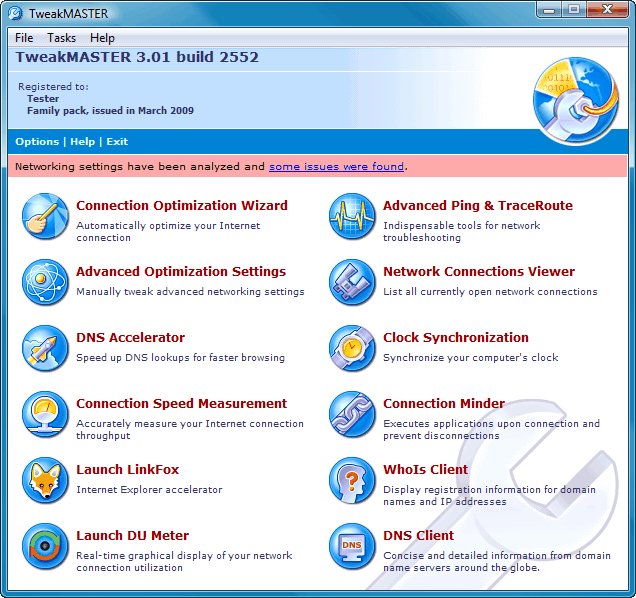
TweakMASTER promotes faster Internet download speeds by carefully and intelligently tweaking numerous key Windows settings to provide a substantially faster Internet experience. It is easy to use and requires no special computer knowledge. No matter what speed you connect at or what other utilities you may have tried, nothing will provide a FASTER Internet connection for you than TweakMASTER... guaranteed!
TweakMASTER can substantially improve your download speeds for all types of connections from dialup to DSL, Cable, and Wireless. Even AOL users will be amazed at how much more responsive their system will be! Supports Windows 2000/XP/Vista/7 plus AOL. No other utility can make that claim and deliver!
TweakMASTER was developed by the network engineers at Hagel Technologies utilizing the vast Windows experience of RoseCitySoftware.com and HelpWithWindows.com. More than merely adjusting registry settings, TweakMASTER also includes an innovative DNS Accelerator to help websites load faster, a handy PC clock synchronization utility, ISP Disconnect Prevention, Traceroute, Ping and Whois utilities, and a network connections viewer.
Using TweakMASTER's simple Wizard, even total computer novices can instantly improve their download speeds. Advanced users will appreciate the wide range of options & advanced features, making this the most configurable and effective Internet Optimizer available today. TweakMASTER can easily double your download speeds and make 'Surfing the Internet' a far more enjoyable experience.
About TweakMASTER
This program is available in English. It was last updated on 29 September, 2026. TweakMASTER is compatible with the following operating systems: Windows.
The company that develops TweakMASTER is Hagel Technologies. The latest version released by its developer is 3.60.
The download we have available for TweakMASTER has a file size of 1.0 MB. Just click the green Download button above to start the downloading process. The program is listed on our website since 2018-04-11 and was downloaded 0 times. We have already checked if the download link is safe, however for your own protection we recommend that you scan the downloaded software with your antivirus. Your antivirus may detect the TweakMASTER as malware if the download link is broken.
How to install TweakMASTER on your Windows device:
- Click on the Download button on our website. This will start the download from the website of the developer.
- Once the TweakMASTER is downloaded click on it to start the setup process (assuming you are on a desktop computer).
- When the installation is finished you should be able to see and run the program.
Program Details
System requirements
Download information
Pricing
Version History
version 3.60
posted on 2018-04-11
updates to major new release
version 2.50
posted on 2006-11-27
minor maintenance updates
Disclaimer
External Download
We do not host TweakMASTER on our servers. We did not scan it for viruses, adware, spyware or other type of malware. This app is hosted by the software publisher and passed their terms and conditions to be listed there. We recommend caution when installing it.
The external download link for TweakMASTER is provided to you by apps112.com without any warranties, representations or guarantees of any kind, so access it at your own risk.
If you have questions regarding this particular app contact the publisher directly. For questions about the functionalities of apps112.com contact us.
